How to give instructions
BeginnerAlmost all of your transmissions have the same structure. You can tell an aircraft to change only four items.
How to control traffic Step 5 of 8
The structure of a transmission
Section titled “The structure of a transmission”Always speak the callsign first. The game uses the callsign to identify the aircraft. Then speak the instructions in the sequence that the aircraft must fly them. The airline and the flight number that the game hears can agree with different aircraft. Then the pilot does not apply the clearance to an incorrect flight. The pilot tells you to speak it again.
For the flight number, “two nine three seven” and “twenty-nine thirty-seven” identify the same flight, 2937. Speak the airline name first.
If you speak the digits of the flight number clearly, the game can find your flight number. Then the pilot can give the readback of a full heading, altitude or speed instruction more quickly. If the game is not sure about the aircraft, the pilot tells you to speak it again.
If a flight number does not agree with an assumed aircraft, the pilot can tell you to speak it again more quickly. This has less effect on the movement on the radar. Speak the airline and the flight number with the instruction.
The game can hear one part of the callsign incorrectly (Lufthansa two kaboch november). If only one of your aircraft agrees with all the digits that you spoke, the pilot gives a readback. If a digit is incorrect, or if two aircraft agree equally, the pilot tells you to speak it again.
The spoken flight number can agree with more than one aircraft. Then the game can select one of these aircraft. Make sure that this aircraft is correct before it applies the instruction. When the game repairs a command, an airline name that the game heard (for example Speedbird) stays in the callsign.
In U.S. sessions, pilots speak four-digit flight numbers in the same groups as you. If you speak “sixty-four thirty-one” or “six four three one”, that aircraft uses the same groups. If you speak a mixture of the two, for example “nine six eighty-three”, the readback is “ninety-six eighty-three.” The aircraft uses your last clear groups for its subsequent transmissions. The pilots speak registrations, and flight numbers of other lengths, as usual.
New in 0.6.3.8 You can speak only the callsign to call an aircraft. If only one of your aircraft agrees with the full callsign, the pilot replies Cathay four one nine six, go ahead. Then speak the instruction. You can speak it without the callsign, and it goes to that aircraft. If the game is not sure about the aircraft, the pilot tells you to speak it again.
Push and hold CONTROL while you speak. Release it when you complete the transmission. For better recognition, give three instructions or less in each transmission.
Headings: the direction of the aircraft
Section titled “Headings: the direction of the aircraft”Headings are compass directions from 001 to 360. Always speak each of the three digits: “one three zero” for 130.
Iberia one two three four, turn right heading one three zero
You can also speak on a heading of one three zero. With “of”, the heading instruction is the same.
“Do not turn heading…” and “the pilot said heading…” do not give a turn instruction. If a transmission contains “do not turn” or “the pilot said”, the game applies no instruction from it. Give a new instruction for the heading that you want.
The aircraft turns onto that heading. It stays on that heading until you give a different instruction. It turns at 3° per second, but it does not bank more than 25°, so a fast aircraft flies a wider turn than a slow one. Not in 0.6.2.552 When you control aircraft with headings, you do vectoring. The headings are vectors.
Direct to a fix
Section titled “Direct to a fix”A waypoint (or fix) is a named point in the airspace, for example RULOS or CASPE. When you send an aircraft direct to a waypoint, the aircraft navigates to it without more instructions.
Iberia one two three four, fly direct RULOS
Use a heading to point the aircraft in an accurate direction. Use direct to send the aircraft back onto its route or onto the approach. In most sessions, you use the two instructions frequently.
After vectoring, you can use all fixes of the flight plan, and all fixes, VORs or NDBs near your sector. The game uses a full NATO spelling of three or five characters as you spell it.
You can also use fixes near each airport that you control, fixes near the aircraft, and the terminal fixes of your airports. If the fix is behind the aircraft, the pilot first speaks “confirm direct [fix]?”. If you spell the fix, the pilot does not ask. New in 0.6.3.4
If the game hears a fix name that is almost correct, the pilot also asks “confirm direct [fix]?”. The pilot does not ask when the fix is on the flight plan of that aircraft or on its expected approach, and the game is sure that it is the only fix you said. The pilot then reads back the correct fix name. New in 0.6.3.8
Altitude
Section titled “Altitude”At low altitudes, the unit of height is feet above sea level. At high altitudes, the unit is flight levels. A flight level is the altitude in hundreds of feet. Thus, flight level 100 is approximately 10,000 feet.
Iberia one two three four, descend altitude five thousand feet
Iberia one two three four, descend flight level one zero zero
You do not have to calculate which unit to use. Give a value, and the game selects feet or flight level from the transition altitude of the airport.
You can speak numbers as usual: twelve thousand, speed two hundred, heading one hundred. After a correction, the game uses the corrected value (five thousand, correction, four thousand). If a value is not complete or not possible, the game uses the only possible value. Thus, flight level one six becomes flight level 160. If more than one value is possible, the pilot tells you to speak it again.
Pilots do not select a level without your instruction. An arrival that you control can stay at the altitude that you gave. If it cannot get to the next published restriction from that altitude, the pilot transmits request further descent, Iberia one two three four. The game also shows the fix and the necessary level.
QNH is the local air pressure setting. Altimeters measure height with pressure, and pressure changes with the weather. Thus, all aircraft in your sector must use the same value, which is your value. The QNH is on the top bar. Give it to an aircraft with this instruction:
Iberia one two three four, QNH one zero one six
You use speed to control the spacing. A line of arrivals at the same speed keeps equal distances between them. If an aircraft is slower, it uses more time to get to the runway, but it stays on its route. Before the runway, all aircraft must be sufficiently slow.
Iberia one two three four, speed two two zero knots
At cruise altitude, you give speed as a Mach number. After “mach decimal”, speak each digit:
Iberia one two three four, speed mach decimal seven eight
To stop your control of the speed, give this instruction:
Iberia one two three four, resume managed speed
Listen to the readback
Section titled “Listen to the readback”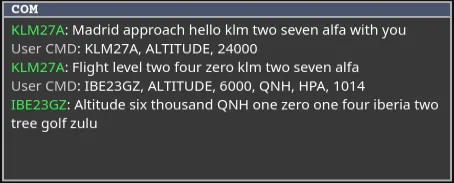
The pilot gives a readback of each instruction. If the readback agrees with your instruction, the instruction is correct. You do not have to do more.
Pilots speak more quickly when you transmit frequently, control much traffic, or make long transmissions. They also speak more quickly when readbacks wait while you or another pilot speak. The time between their transmissions decreases. When the radio has less traffic, pilots return to their usual speed. Each pilot still gives a full readback. New in 0.6.3.8
Pilots speak a little faster than usual, and each pilot has a slightly different speed. The game does not change the pitch of their voices. While the game prepares a transmission, you hear no sound. The radio effects start with the voice of the pilot.
Not in 0.6.2.552 The included pilot voices speak English with 16 accent families. Each pilot keeps the same voice for the flight. Each instruction stays with its value, as in “descend five thousand.” Long pauses within a readback are shorter. Busy radio traffic makes the readback faster, but the words stay the same.
Not in 0.6.2.552 The accent agrees with the airline. For example, Air France pilots speak with a French accent and Lufthansa pilots with a German accent. Airlines with crews from many countries, such as Ryanair, use a mix of accents. Airlines that are not on the list use all 16 accents.
To read the transmissions, open COM from the top bar. COM shows the instructions that the game heard. When an instruction does not operate, examine COM first to find the cause. The line of a pilot shows in COM when you start to hear the voice of that pilot. Not in 0.6.2.552
When the game is not sure about a waypoint, procedure or runway, the pilot wants you to make sure of it. The game does not select a value without your instruction. Speak affirm or negative, or speak the clearance again. The game applies a corrected value immediately.
If you give the aircraft a new instruction before the pilot asks, the pilot does not ask. The new instruction replaces the clearance that the pilot held. If the aircraft is not yours before the pilot asks, the pilot does not ask, and COM tells you that nothing was sent. If no pilot voice operates, the question shows in COM. Speak affirm or negative as usual.
Not in 0.6.2.552If the pilot cannot identify a waypoint after that, the pilot tells you to use NATO spelling. Each time that the pilot speaks to you, you get the full time again for your transmission. When you make sure of a name, the game keeps it for that airport. To examine, delete or reset these names, press Shift+K.
The Popularity view in the same panel shows the fixes, headings and approaches that other controllers use most at this airport and runway configuration. This data comes from telemetry that does not identify persons. It only changes the sequence in which the recognizer looks for items. It does not replace the instruction that you spoke.
The game can hear a fix, procedure or frequency incorrectly. If only one item on the route, the published charts or the frequency list agrees, the game applies that item. The pilot does not tell you to make sure of it.
The recognizer also knows the name of your station as the pilots speak it (Taipei Approach). It also knows the published departure and en-route stations of the airport (contact Taipei Control). Thus, you can speak these names as usual.
If the pilot tells you to speak an altitude again, speak the callsign and the value: Iberia one two three four, five thousand feet. Do this in 25 seconds or less. After 25 seconds, speak the full clearance again.
When the pilot wants you to make sure of a direct-to or descend-via clearance, the aircraft keeps the full clearance. No instruction from that transmission has an effect until you give the necessary information.
During this time, the readback of a different pilot can wait. When the first pilot has the information, the pilots give each readback that waits one time, in its initial sequence. If a readback that waits is not necessary at that time, or if you canceled it, the game removes it. The pilot does not give it at an incorrect time or two times.
When a pilot wants you to make sure of an item, this pilot also waits until the transmission of a different pilot is complete. The two transmissions do not stop each other, and the voice of the pilot does not change.
If a pilot wants you to make sure of a new item, this item replaces the previous item that you did not speak about. Speak about the last item. Your time to speak starts when the transmission of the pilot is complete.
Who speaks next Not in 0.6.2.552
Section titled “Who speaks next ”Pilots speak one at a time on your frequency, in a fixed sequence:
| When | The pilots |
|---|---|
| You give instructions to two or more aircraft | Read back in the sequence that you spoke to them. |
| You speak to an aircraft | Do not start a new call until that pilot reads back, or for 10 seconds. |
| You release the push-to-talk key | Answer after 0.3 to 1 second. Usually, the time is approximately 0.6 second. |
| A pilot wants to start a call | Wait for 1 to 3 seconds of silence first. Each pilot waits a different time. |
| An aircraft goes around | Speak the go-around report first, before other calls and readbacks. |
| You do not answer a request | Speak the request again after 10 to 20 seconds, not more than two times. |
| You push the push-to-talk key while a pilot speaks | The voice of that pilot stops with a short squeal. The pilot speaks the call again after the other readbacks. |
When the frequency is busy, these times are shorter. When you give an instruction to an aircraft, its pilot does not repeat a request. When a pilot tells you to say again, your transmission does not stop that pilot.
When you make an error
Section titled “When you make an error”To cancel the last instruction, speak disregard not more than approximately ten seconds after it:
Iberia one two three four, disregard
If you speak negative first, and then a new heading, the game applies that heading as a correction. It does not cancel the previous instruction. Disregard followed by a new clearance also applies that clearance. Not in 0.6.2.552 Disregard also brings back a level that the pilot did not start yet. If your climb cancelled an approach, disregard brings that approach clearance back. Not in 0.6.2.552
After ten seconds, give a new clearance. The new clearance replaces the previous one. If the game frequently does not hear you correctly, a Voice not working? panel shows. It has the microphone test and the voice settings. It does not change your settings without your instruction.
For the reason that the game gives for a rejected transmission, see Voice troubleshooting.
All the commands and their spoken examples are in All commands.