Start here
BeginnerYou are the controller. Aircraft come onto your screen on their routes. You speak to them to keep them apart and to get them to the runway.
How to control traffic Step 1 of 8
The full game in four steps
Section titled “The full game in four steps”You hold a key and speak an instruction. The pilot gives a readback and obeys the instruction. This sequence is all of the game. The other pages tell you which instructions you can speak, and when you can speak them.
An error does not cause a penalty. No score counts down, and there is no time limit. The traffic waits for you.
Necessary items
Section titled “Necessary items”- A microphone. You can use a headset or a laptop microphone.
- Approximately 10 minutes without noise for the first session.
- No knowledge of air traffic control. These pages start at zero.
Speech recognition operates on your computer. The game does not send voice recordings if you do not tell it to. If you enable diagnostics, the game can send command text and parser results, without data that can identify you. Audio goes out of your computer only when you do these two steps:
- You manually add the last failed clip to a local diagnostic export.
- You manually send that ZIP file.
The first start is some minutes long
Section titled “The first start is some minutes long”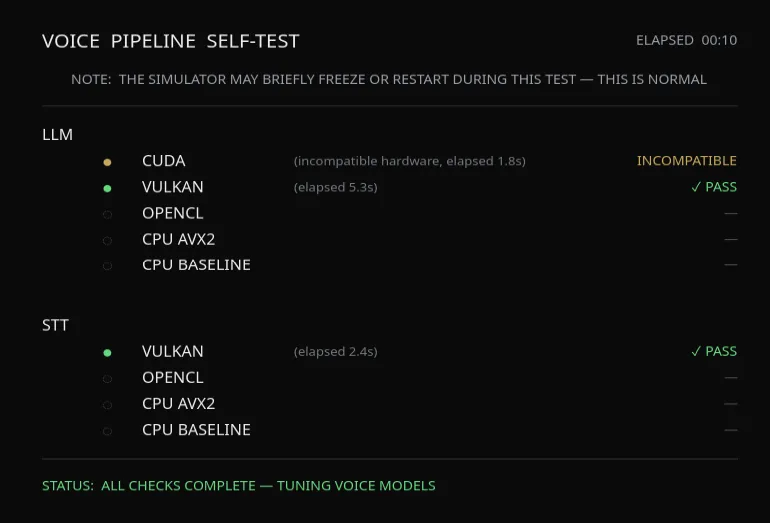
- Speech recognition — it hears your words.
- Command understanding — it changes your words into instructions.
- Pilot voices — the readbacks that you hear.
When you start the game for the first time, it tests your computer. Then it adjusts these three parts for your computer. Let the test complete. The game keeps the result. Thus, each subsequent start goes directly to the main menu.
These parts operate more quickly with a dedicated graphics card. But this card is not necessary.
The start-up screen examines four items below the logo: Microphone, Speech recognition, Pilot voices and Navigation data. Navigation data shows the AIRAC cycle that the game opened. If the four items operate correctly, the game continues without a click. If you must do a step for an item, the game waits for one click.
After a new installation, the game then starts the tutorials. There are four short lessons. Then the game shows the main menu.
The sequence of these pages
Section titled “The sequence of these pages”There are seven short pages in this sequence. At its end, each page has a link to the next page.
- Start here — this page.
- The tutorials — the four lessons that the game starts for you.
- Air traffic control basics — the job, your airspace and the three methods to guide aircraft, as text.
- The radar screen — the items on the screen, and the aircraft that you control.
- How to give instructions — headings, altitudes, speeds, and how to speak them.
- Procedures and approaches — the published routes that traffic is on when it gets to you.
- Your first session — prepare a session and give your first three clearances.
After these pages, How to use the game gives the full information about each screen. All commands is a table of all commands. You can keep it open during a session.